AI-Außen-Rendering: Von Außenwirkung bis Konzeptvisualisierung (2026)
May 30, 2026 · 6 Min. Lesezeit
AI-Außen-Rendering macht aus einem Gebäudefoto in Minuten ein Dutzend Designrichtungen – neue Verkleidung, Dach, Bepflanzung, Dämmerungshimmel. So funktioniert es.
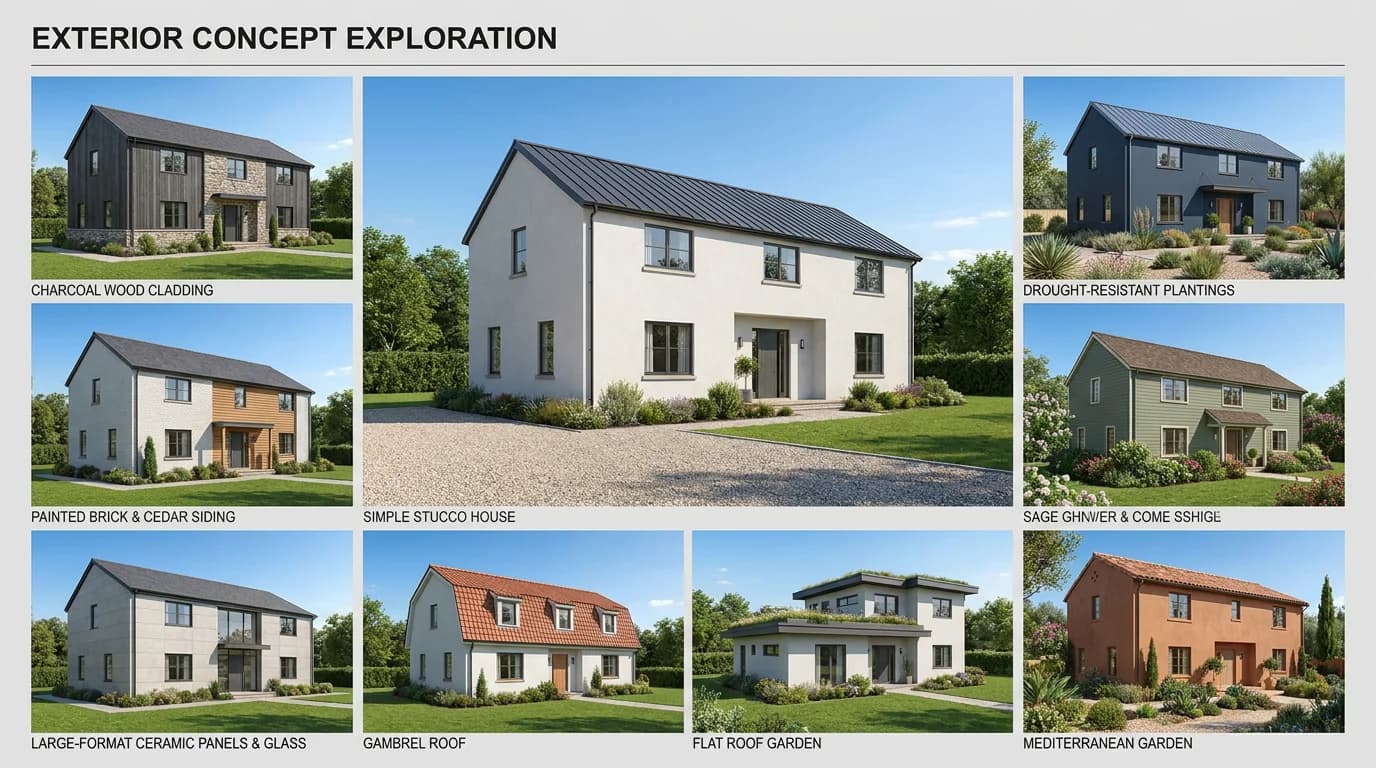
Eine Eigentümerin will wissen, wie ihr Haus mit dunkler Verkleidung statt beigem Putz aussähe. Ein Makler möchte einem müden Bungalow sein Potenzial entlocken. Ein Architekt braucht vor einem Termin drei Fassadenvarianten. Früher warteten alle drei tagelang und bezahlten einen Visualisierer.
Heute wird ein Gebäudefoto in Minuten zu einem Dutzend Außenrichtungen. AI-Außen-Rendering verwandelt ein einziges Foto in umgestaltete Fassaden, neue Materialien, frische Bepflanzung und Dämmerungshimmel – schnell genug, um live zu erkunden, und günstig genug, um es frei einzusetzen. Dieser Leitfaden erklärt, wie es funktioniert, was Sie ändern können und wie Architekten, Fotografen und Makler es jeweils einsetzen.
Was AI-Außen-Rendering ist
AI-Außen-Rendering erzeugt aus einem Foto eine fotorealistische neue Version der Gebäudeaußenseite. Statt Geometrie zu modellieren und Licht zu simulieren, wie es klassisches Rendering tut, transformiert es das Foto direkt – die Struktur des Gebäudes bleibt erkennbar, während Materialien, Farbe, Dach, Bepflanzung, Umgebung und Himmel sich ändern.
Der entscheidende Unterschied ist der Input. Fotobasiertes AI-Rendering arbeitet aus einem Foto eines realen Gebäudes, nicht aus einer CAD-Datei oder einem 3D-Modell. Das macht es perfekt für Bestandsgebäude, Renovierungsvorschauen und Außenwirkungsarbeit und weniger geeignet, einen ungebauten Entwurf von Grund auf zu rendern – dafür sehen Sie die modellbasierten Tools in unserem Leitfaden zur besten AI-Rendering-Software für Architekten.
Was Sie in einem Außen-Rendering ändern können
Ein leistungsfähiges Außen-Tool gibt Ihnen Kontrolle über die Elemente, die bestimmen, wie ein Gebäude wirkt. Im Außenmodus von RoomLift gehört dazu:
- Architekturstil – Gestalten Sie die Fassade als modern, zeitgenössisch, klassisch, kolonial, mediterran, Craftsman und mehr um.
- Fassadenmaterialien – Ziegel, Natursteinverblendung, Putz, Holzverkleidung, Vinyl, Faserzement, Metallpaneele, Sichtbeton.
- Dach – Sattel-, Walm-, Flach-, Mansarddach und weitere Formen, mit Materialoptionen.
- Farbkonzepte – neutral, Erdtöne, kräftiger Kontrast, monochrom, warme oder kühle Paletten.
- Bepflanzung – modern-minimalistisch, klassischer Garten, trockenheitsverträglicher Vorgarten, tropisch, englischer Cottage-Garten, japanischer Zen und mehr.
- Einfahrten und Wegeflächen – Beton, Ziegelpflaster, Naturstein, Kies, versickerungsfähiges Pflaster.
- Umgebung und Bildausschnitt – Vorstadt, Stadt, Land, Küste, Berge, mit Kameraausschnitt vom architektonischen Detail bis zur weiten Landschaft.
- Himmel und Tageszeit – Austausch gegen einen klaren blauen Himmel oder eine Dämmerungsumwandlung für eine kinoreife Hauptaufnahme.
Erzeugen Sie mehrere Richtungen aus einem Foto, stellen Sie sie nebeneinander, und die Entscheidung, die früher eine Woche Hin und Her kostete, fällt an einem Nachmittag.
Gestalten Sie eine Gebäudeaußenseite aus einem einzigen Foto in 20 Sekunden um – RoomLift kostenlos testen
Stage your first room in 20 seconds. No design skills needed.
Wie jede Zielgruppe es nutzt
Dieselbe Fähigkeit löst für jeden Beruf ein anderes Problem.
Architekten: Schnelle Außenkonzepte und Renovierungsstudien
Für frühe Konzeptarbeit an Bestandsgebäuden und Renovierungsprojekten erlaubt AI-Außen-Rendering, Materialien und Massenrichtungen aus einem Baustellenfoto zu erkunden, ohne sich auf ein Modell festzulegen. Es ist ideal für die "Was wäre, wenn die Verkleidung Holz und das Dach flach wäre?"-Gespräche, die geschehen, bevor irgendetwas feststeht. Präsentieren Sie Optionen live und wechseln Sie dann für genaue finale Ergebnisse zum klassischen Rendering – den Workflow gliedern wir in AI vs. klassisches Architektur-Rendering auf.
Fotografen und Makler: Außenwirkung, die verkauft
Die Außenwirkung ist das Erste, was ein Käufer sieht, und das Außen-Leitbild erzeugt den Klick. Nutzen Sie AI-Außen-Rendering, um einen grauen Himmel zu ersetzen, die Bepflanzung aufzuräumen, eine frische Fassadenfarbe vorab zu zeigen oder das Renovierungspotenzial einer veralteten Immobilie sichtbar zu machen. Kombiniert mit einer Dämmerungsumwandlung beim Leitbild wird aus einer gewöhnlichen Außenaufnahme das stärkste Bild eines Inserats. In unserem Leitfaden zur Dämmerungsumwandlung finden Sie die Twilight-Technik.
Eigentümer und Renovierer: Sehen, bevor Sie ausgeben
Der schwerste Teil jedes Außenprojekts ist, Geld für einen Look auszugeben, den man sich nur vorstellen kann. AI-Außen-Rendering lässt eine Eigentümerin die Variante ihres eigenen Hauses mit dunkler Verkleidung und Flachdach sehen, bevor sie für ein einziges Muster bezahlt. Es macht aus "ich glaube, das sähe gut aus" ein "so sieht es aus" – und genau so werden Renovierungsentscheidungen tatsächlich getroffen.
So gelingt ein gutes Außen-Rendering
Ein paar Gewohnheiten unterscheiden ein überzeugendes Außen-Rendering von einem offensichtlichen.
Beginnen Sie mit einem klaren, frontalen Foto. Eine gut beleuchtete Aufnahme der vollen Fassade, einigermaßen rechtwinklig zum Gebäude aufgenommen, gibt der AI am meisten Material. Vermeiden Sie nach Möglichkeit starke Verdeckung durch Autos, Personen oder wucherndes Grün.
Ändern Sie beim Erkunden jeweils eine große Sache. Wenn Sie Material, Dach, Farbe und Bepflanzung auf einmal tauschen, können Sie nicht erkennen, welche Änderung Ihnen tatsächlich gefiel. Iterieren Sie bewusst.
Halten Sie Proportionen glaubwürdig. Die stärksten Ergebnisse respektieren den realen Maßstab und die Struktur des Gebäudes. Nutzen Sie die Ausschnitt- und Umgebungsoptionen, um das Gebäude in einen passenden Kontext zu setzen, statt gegen das Originalfoto zu arbeiten.
Schließen Sie hochauflösend ab. Geben Sie mit bis zu 4K aus, damit das Rendering auf einer Inseratsseite, einer Präsentationstafel oder im Druck standhält.
AI-Außen-Rendering vs. klassische Außenvisualisierung
| AI-Außen-Rendering | Klassisches Außen-Rendering | |
|---|---|---|
| Input | Ein Foto | Ein 3D-Modell |
| Tempo | 10–20 Sekunden | Stunden für Einrichtung und Berechnung |
| Kosten | Monatsabo | 500 €–2.000 € pro Bild ausgelagert |
| Ideal für | Konzepte, Renovierungsvorschauen, Außenwirkung | Genaue finale und technische Visuals |
| Genauigkeit | Annähernd | Exakte Geometrie und Materialien |
Zum Erkunden von Richtungen und zum Verkaufen einer Vision gewinnt AI bei Tempo und Kosten. Für finale, genauigkeitskritische Ergebnisse führt klassisches Rendering weiterhin. Die meisten Profis nutzen beides – AI zum Entscheiden und Präsentieren, klassisches Rendering zum Finalisieren.
Das Fazit
AI-Außen-Rendering schließt die Lücke zwischen "stell dir vor" und "hier ist es". Aus einem Foto erzeugen Sie in Minuten ein Dutzend Fassaden-, Material-, Bepflanzungs- und Himmelsrichtungen – für Architekten, die Konzepte erkunden, für Fotografen und Makler, die die Außenwirkung steigern, und für Eigentümer, die entscheiden, was sie bauen. Es arbeitet aus Fotos, nicht aus Modellen, und ist damit der schnellste, günstigste Weg, das Potenzial eines realen Gebäudes zu visualisieren. Kombinieren Sie es mit klassischem Rendering, wenn Genauigkeit auf dem Spiel steht.
Machen Sie aus einem Gebäudefoto eine Reihe von Außenkonzepten – starten Sie Ihre kostenlose RoomLift-Testversion
Stage your first room in 20 seconds. No design skills needed.
Quellen & Referenzen
- ArchDaily (2025). How AI-Powered Rendering Crushes Bottlenecks in Architecture and Interior Design. ArchDaily.
- Visoid (2025). AI vs Traditional Architectural Rendering: What's the Difference?. Visoid Blog.
- National Association of Realtors (2024). Profile of Home Staging. NAR Research.
Bereit, Ihre Anzeigen zu transformieren?
Richten Sie Ihren ersten Raum ein in 20 Sekunden. Keine Designkenntnisse nötig.