




RoomLift Logo
Start for free

AI Virtual Staging for Realtor.com Listings

Furnish empty rooms with photorealistic AI staging and turn your Realtor.com listing into a lead generation machine.

Realtor.com is the official site of the National Association of Realtors, used by millions of buyers every month. Listings with high-quality staged photos earn more clicks, more saves, and more contact form submissions -the metrics that matter when you're competing for leads.

Realtor.com OptimizedLead-Driving PhotosNAR-Aligned DisclosurePro & 4K Quality
Stage your Realtor.com listing

10 Free Renders. Takes 2 min.

Monthly Realtor.com visitors

100M+

Of buyers say photos are most useful

87%

More leads for listings with staged photos

2×

Per staged photo

<60s

A complete creative suite

Everything you need to visualize, present, and sell — from first concept to final delivery.

Redesign any room in seconds

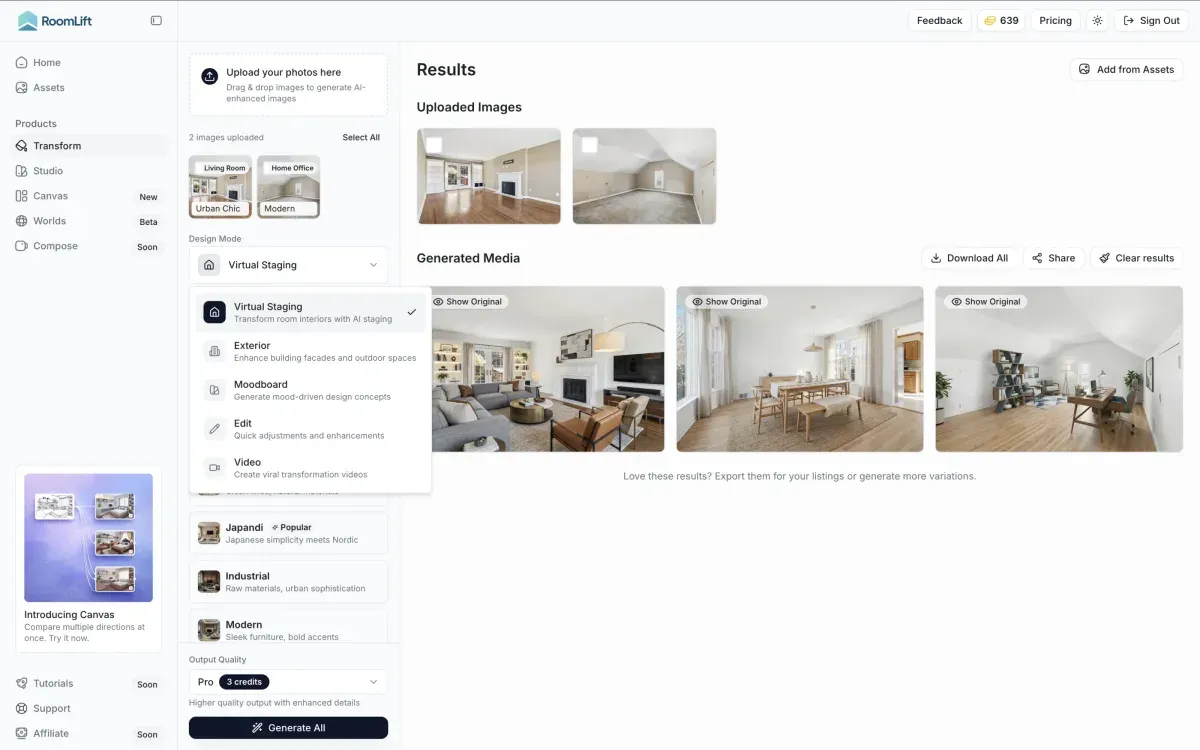
Upload a photo of any interior or exterior and transform it into a completely new style. Choose from 7+ design presets or transfer your own reference image.

  • Interior and exterior support
  • 7+ styles: Scandi, Japandi, Modern, Industrial, and more
  • Up to 4K resolution export
  • Multiple variations per generation
  • Custom style transfer from reference images
AI room transformation showing style change

How It Works

Three simple steps to transform any space

Step 1

Upload your photo

Snap or upload a photo of any room or space

Step 2

Choose a style

Select from 7+ design styles and room types

Step 3

Download your render

Get photorealistic results in under 60 seconds

Why Professionals Choose RoomLift

Optimized for Realtor.com's Gallery

High-resolution output that looks sharp in Realtor.com's photo carousel, full-screen viewer, and mobile app -where the majority of browsing happens.

Drive More Contact Requests

Staged photos keep buyers engaged longer on your listing, increasing the likelihood they'll tap 'Contact Agent' or 'Request a Tour' -the actions that generate your leads.

NAR-Aligned Transparency

As the official NAR site, Realtor.com emphasizes ethical marketing. RoomLift makes it easy to add disclosure labels that align with NAR's Code of Ethics.

Enhanced Listing Presence

Realtor.com promotes listings with rich media. Staged photos complement your existing photography to create a more complete, polished listing presentation.

Mobile-First Image Quality

Over 60% of Realtor.com traffic comes from mobile. RoomLift's output is optimized for both mobile screens and desktop, ensuring your staging looks great on any device.

Multi-Photo Consistency

Stage multiple rooms in the same design style for a cohesive listing that looks professionally designed from the first photo to the last.

Realtor.com is backed by the National Association of Realtors and serves as one of the most trusted real estate search portals in the country. For agents, this means your listing photos carry weight -they're seen by motivated buyers who take the platform seriously. Virtual staging helps you make the most of that visibility by transforming vacant or poorly furnished rooms into aspirational spaces that drive engagement. On Realtor.com, engagement translates directly to leads: every additional second a buyer spends on your listing increases the chance they'll tap "Contact Agent" or "Schedule a Tour."

Because Realtor.com is closely aligned with NAR standards, transparency in your listing presentation matters. RoomLift is built for this: it adds furniture and decor without altering structural elements, and you can easily add disclosure labels before uploading. This lets you deliver beautiful, lead-generating listing photos while maintaining the professional and ethical standards that Realtor.com buyers expect. For agents managing vacant listings in competitive markets, this combination of speed, quality, and compliance makes AI virtual staging an essential part of the listing strategy.

Frequently Asked Questions

Everything you need to know about RoomLift — for designers, agents, and anyone transforming spaces with AI.

Does Realtor.com allow virtually staged photos?
Realtor.com pulls listings from MLS feeds, so your local MLS board's rules apply. Most boards permit virtually staged photos with appropriate disclosure. Since Realtor.com is affiliated with NAR, adhering to the NAR Code of Ethics regarding truthful representation is especially important.
How should I disclose virtual staging on Realtor.com?
Follow your local MLS board's disclosure requirements -typically a watermark on the image, a caption note, or a remark in the listing description. Since Realtor.com syndicates from MLS, the disclosure you add there will carry through.
What photo resolution works best for Realtor.com?
Realtor.com recommends high-quality photos with a minimum of 1024×768 pixels. RoomLift's standard output meets this easily, and the 4K option provides premium resolution for luxury listings where image quality is paramount.
Will staging help my listing rank higher on Realtor.com?
Realtor.com's search considers factors like listing freshness, price, and engagement. While there's no direct ranking boost for staged photos, listings with better photos earn more clicks, saves, and contact requests -engagement signals that can indirectly improve your listing's visibility.
Can I stage a listing that's already on Realtor.com?
Yes. You can stage photos and update your MLS listing at any time. Updated photos will sync to Realtor.com through your MLS feed, giving your listing a refresh that can reignite buyer interest.
Start designing for free

No credit card required. 10 free renders included.